Posts

Showing posts with the label EQ

EQ Frequency Cheat Sheet

Image
EQ Frequency Cheat Sheet Source: https://www.masteringthemix.com/

Got a harsh Mix?

Image
Got a harsh Mix?  Simply cutting the high frequencies will affect the tonal balance of your whole mix. That might be necessary, but more often than not you only want to reduce the louder high-frequencies. For this task, a dynamic EQ is perfect. You can set the band of the high frequencies you want to reduce, then set the threshold so the reduction only happens when those high-frequencies are too loud in the mix.  ————— Source: https://www.masteringthemix.com/

How To Fix A Harsh Sounding Mix or Frequencies

Image
How To Fix A Harsh Sounding Mix: The first step is to locate which channel or channels are causing the issue. In most cases, harshness is caused by just a couple of channels, so it’s not always a good idea to try and fix the problem on the master fader. Try muting a few usual suspects one by one until the harshness disappears. Mute the vocal, the hi-hats, the prominent synths, string parts or any other channels that you think might be making your mix sound harsh. When you’ve identified the trouble-maker, pull up a dynamic EQ and take a look at the frequency analyzer. As you can see in the example below, there is a clear build-up around 4kHz. That’s the area I want to ‘control’ rather than cut completely. ---------------------- Source: https://www.masteringthemix.com/

How To Transparently Fix Resonance In A Mix

Image
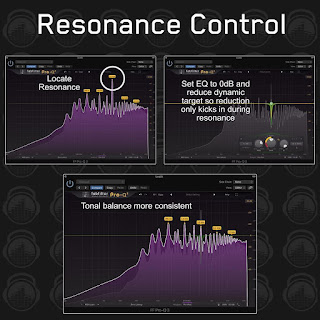
How To Transparently Fix Resonance In A Mix: A resonance might only come into the mix at a certain point depending on the musical note, so you don’t want to statically cut the frequency. A dynamic EQ will be triggered only when the resonance kicks in, leaving the rest of the performance with its original tonal balance. The trick here is to find the resonance and set the EQ band to 0dB. From that point, bring down the dynamic band with the thinnest possible Q so it’s focused on that specific frequency. Keep tweaking the dynamic gain reduction (keeping the main EQ at 0dB) until you feel like the resonance is under control. It’s important to use your ears to set the exact amount of reduction when fixing resonances. There is a point the resonance is controlled and it’s no longer a problem, reduce it further and you’ll find that the channel will sound thin. Some resonances are very subtle and only require adjustments of a few dB for the sound to be natural. --------------------- ...

Using Dynamic EQ to lower the Second Note

Image
Bass synth notes can sometimes get a little crazy with the loudness difference between them. It’s almost like certain notes resonate a few decibels louder than others. This can be down to the performance (live or midi) or just the way the synth responds to the notes being played. This can make a bass line sound too jumpy and out of control. If you don’t manage this dynamic it can throw off your mastering compression and limiter at a later stage. In this image we have two notes in a bass line, note 1 and note 2. Note 2 is louder than note 1. We want to reduce the loudness of note 2 without affecting note 1. To do this, find the frequency of note 2 and create an EQ band with a high ‘Q’ so it only affects that note. Then tweak the threshold so the eq is only triggered by the louder note. Source: https://www.masteringthemix.com/

Fixing A Mix Using A Dynamic EQ

Image
Producing a song is a super creative process. When you get into the zone and everything starts to flow it feels amazing. In this state of mind, you probably won’t be paying close attention to some of the finer details of the mix. You wake up the next morning and excitedly listen to your song… Now that the dust has settled from your glorious flow, you’re starting to notice a few issues:   “My mix sounds too harsh” “My mix is too muddy” “That lead sound is super resonant” “I thought the track had more energy” etc… If you’ve ever said those statements in a mix session, then this post is for you. I’ll run through some examples of how you can fix sonic issues in your mix with a dynamic EQ.   HOW TO FIX A HARSH SOUNDING MIX The first step is to locate which channel or channels are causing the issue. In most cases, harshness is caused by just a couple of channels, so it’s not always a good idea to try and fix the problem on the master fader.  Try muting a f...

How to Decide Whether to Cut the EQ or Attenuate the Gain

Image
EQ Cut Or Gain Attenuation?⁠ —————⁠ Knowing the correct approach to fix an issue that you uncover in a mix comes with experience and discernment. Let’s say you feel the mix is congested around 300Hz and you determine that the guitar channels are causing the congestion. Now you’re faced with the decision: ‘Should I cut the guitars around 300Hz, or should I lower the guitars gain to reduce the congestion’? If the tonal blance of the guitar is great, then lower the gain. If it's too thick, then apply an EQ cut. Make a conscious choice after listening!⁠ —————⁠ In The Pretender by Foo Fighters, mix engineer Rich Costey took the approach that it was better to maintain the thickness of the guitar sounds and attenuate the volume to get all the guitars fitting in perfectly. ⁠ —————⁠ Costey approaches mixing as if he’s conducting an orchestra where filtering the woodwinds to reduce an oboe sticking out is simply not possible. He believes the oboe player should play more softly so the res...

The Carving Equalizer

Image
Think of your song like a novel. Every track can’t be the main character. There have to be some other characters to fill out the story. Carving puts your characters in order. ⁠ ----------⁠ For example, carving EQ allows you to take unnecessary low-end off your keys so that it doesn’t mask the kick and bass. You might have two elements battling each other in the same frequency. Like vocals and synth. Carve a space for each by cutting the frequencies on one while boosting the same range on the other.⁠ ----------⁠ Source: https://www.masteringthemix.com/

How to Make Great Mixes on Small Speakers ⁠

Image
How to Make Great Mixes on Small Speakers ⁠ — — — — —⁠ Do not be afraid to try bringing in a well-produced commercial record that relatively matches the production style of the song you are mixing. Toggle through your custom filter settings and notice how the commercial release responds to the same setup. This reference would give you an idea of how your mix should sound.⁠ Source: https://www.masteringthemix.com/

How to EQ VOCALS: Must-Know Techniques⁠

Image
How to EQ VOCALS: Must-Know Techniques⁠ — — — — —⁠ If you want the vocals to sound warmer, cut the highs rather than boosting the lows. You should always cut to make something sound better, and boost to make something sound different.Then boost later to give your vocal a slightly different character if you want. It’s always good practice to apply your cuts before compression and your boosts after. — — — — —⁠ Most voices are centered between 120-250Hz. This means that, in most cases, everything below 50Hz is rumble and noise. Cut it off if you don't have an extremely low voice.⁠ — — — — —⁠ A wide, gentle boost between 2-6kHz can improve clarity. If your vocal recording sounds muffled or a bit too warm, try applying a wide boost of 2-3dB between 2kHz and 6kHz. Remember to boost after compression. On the flip side, if the vocals sound harsh, try reducing these frequencies.⁠ — — — — —⁠ Most instruments are centered around 250-350Hz, If there are vocal tracks in the mix, it...